

Description
Real Accessibility adds an accessibility menu to your WordPress site (you may know it as an accessibility widget or accessibility toolbar). Visitors open it from a floating button and change the site to suit them: bigger text, higher contrast, a font that is easier to read, a reading guide, no animations and more. It is built for people with low vision, dyslexia, ADHD, epilepsy or motor impairments, and for older visitors. Whatever they choose stays in place as they move from page to page.
The plugin is free, with every feature included. You don’t need an account or an API key, and there is no paid version. Choose your brand color, place the button, turn the menu on, and you’re done.
Highlights
- Free, with all 7 profiles and all 14 adjustments included.
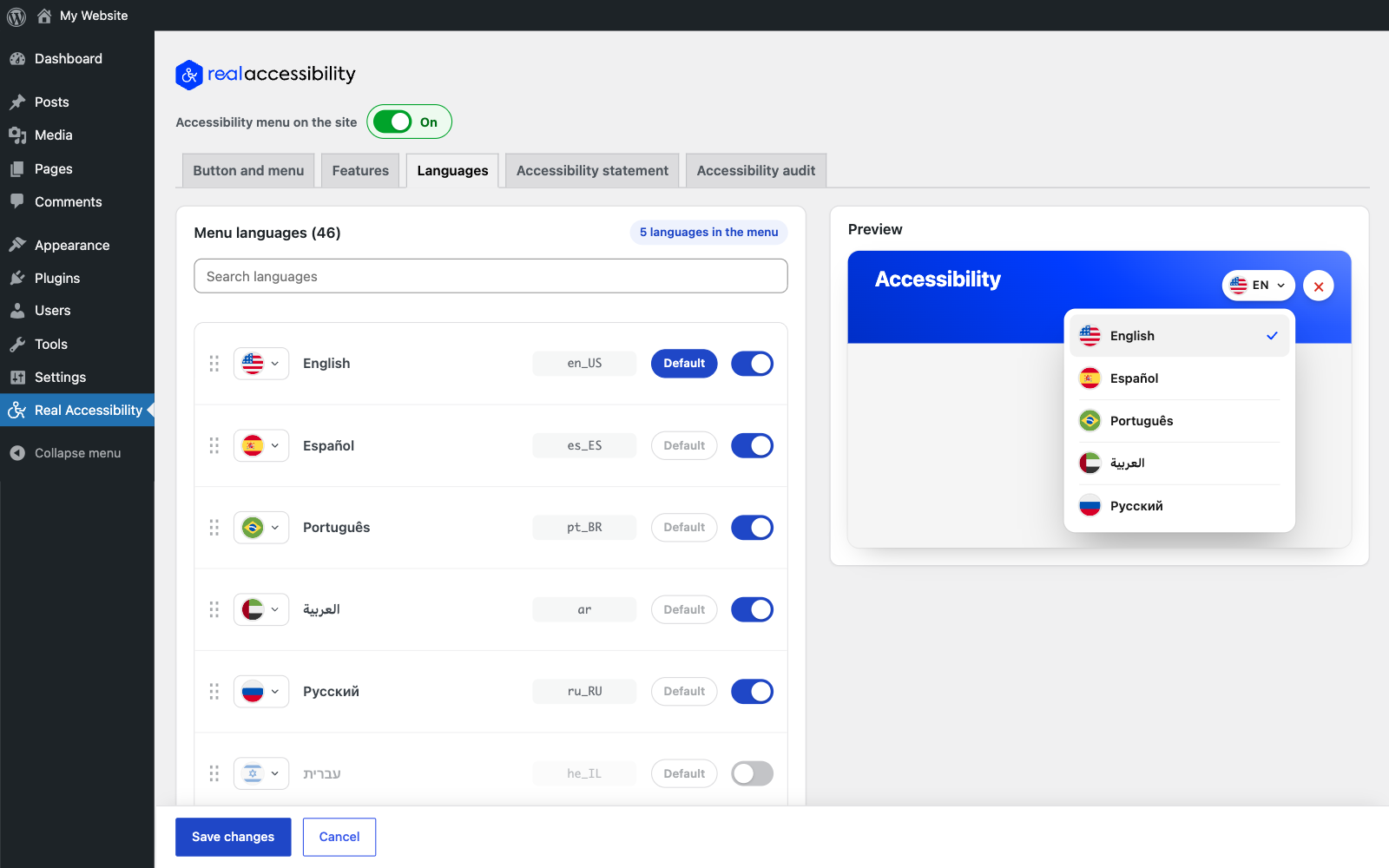
- Translated into 46 languages, with full right-to-left support for Hebrew, Arabic, Persian and Urdu.
- Matches your brand. The whole menu takes its colors from one brand color, and text and icons switch between black and white to stay readable.
- Small and fast: about 30 KB compressed, with no jQuery, no web fonts and no requests to other servers.
- No cookies and no tracking. Visitor choices are stored in their own browser.
- Works with any theme or page builder. The menu lives in its own Shadow DOM, so your theme’s CSS can’t affect it.
- Works with page caching and CDNs, because the adjustments are applied in the browser.
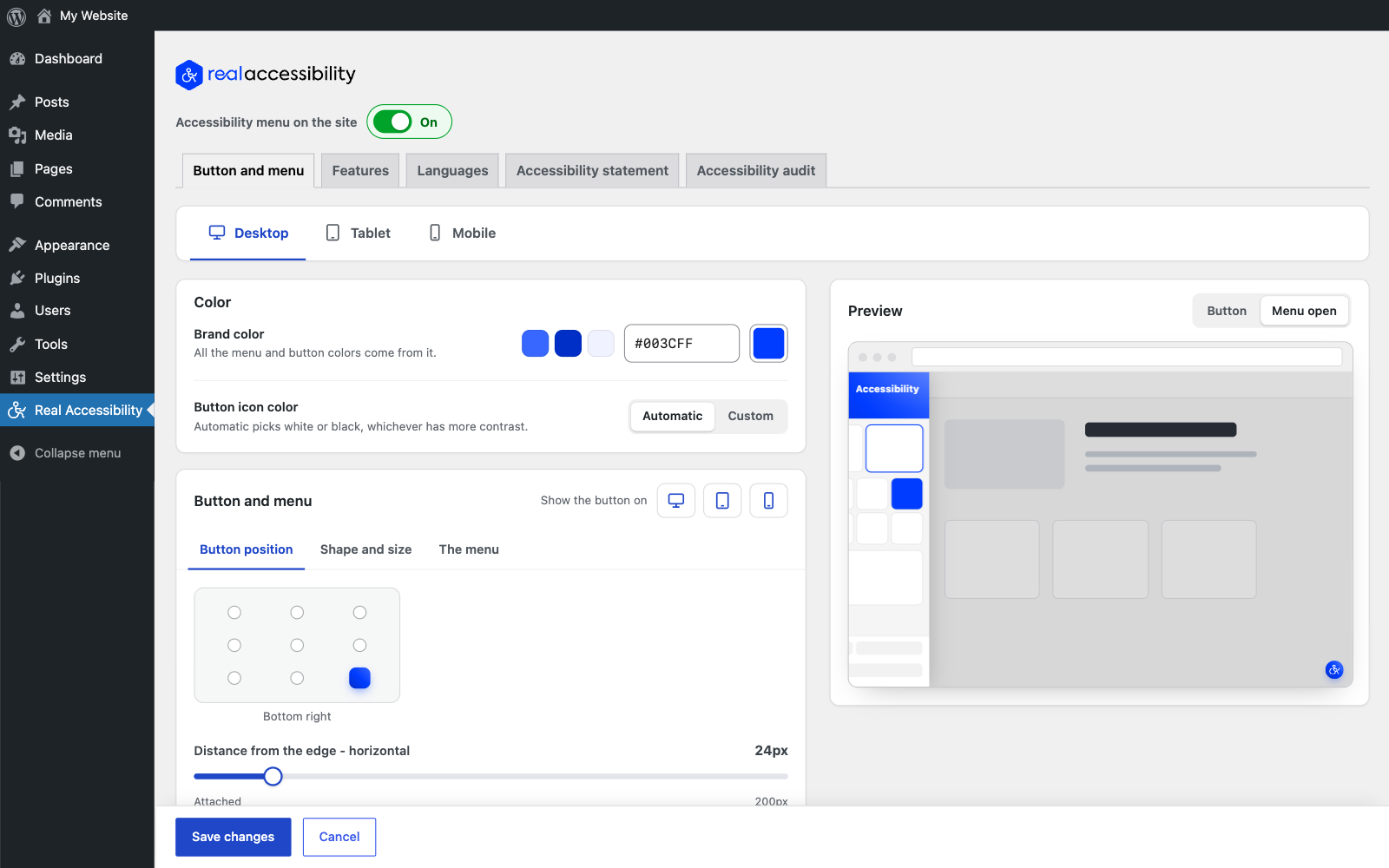
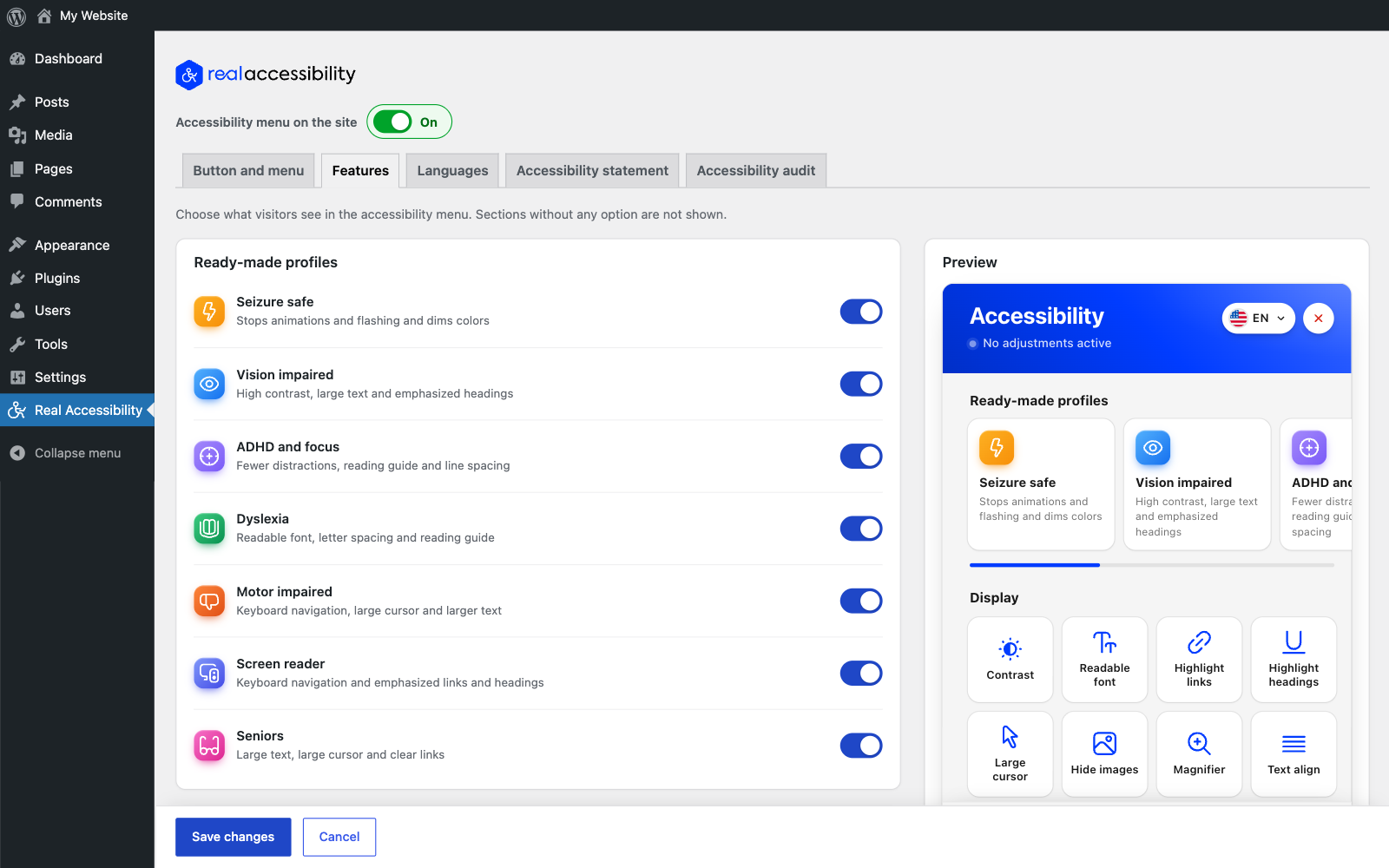
- A live preview in the settings shows the button and the menu as you change them.
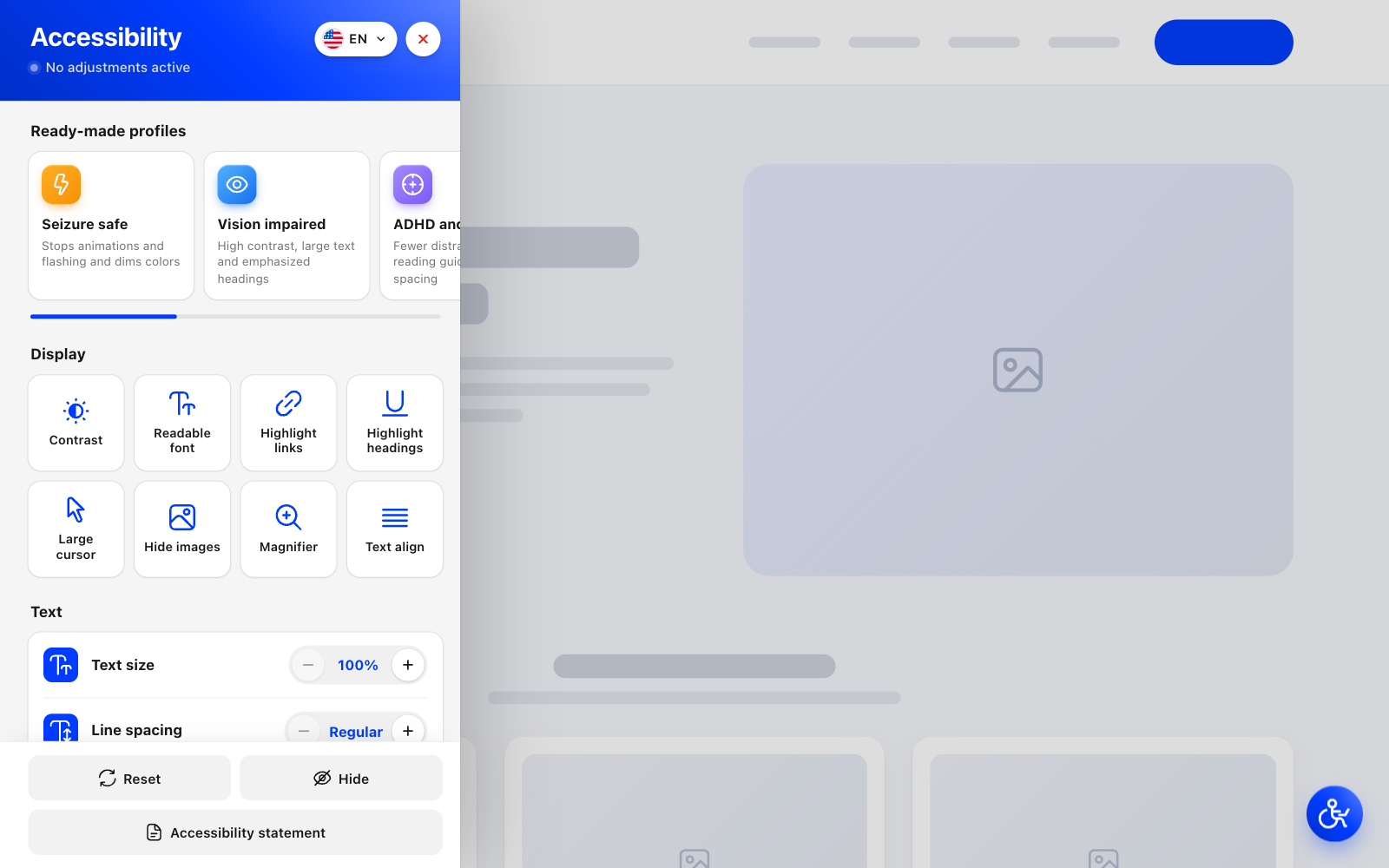
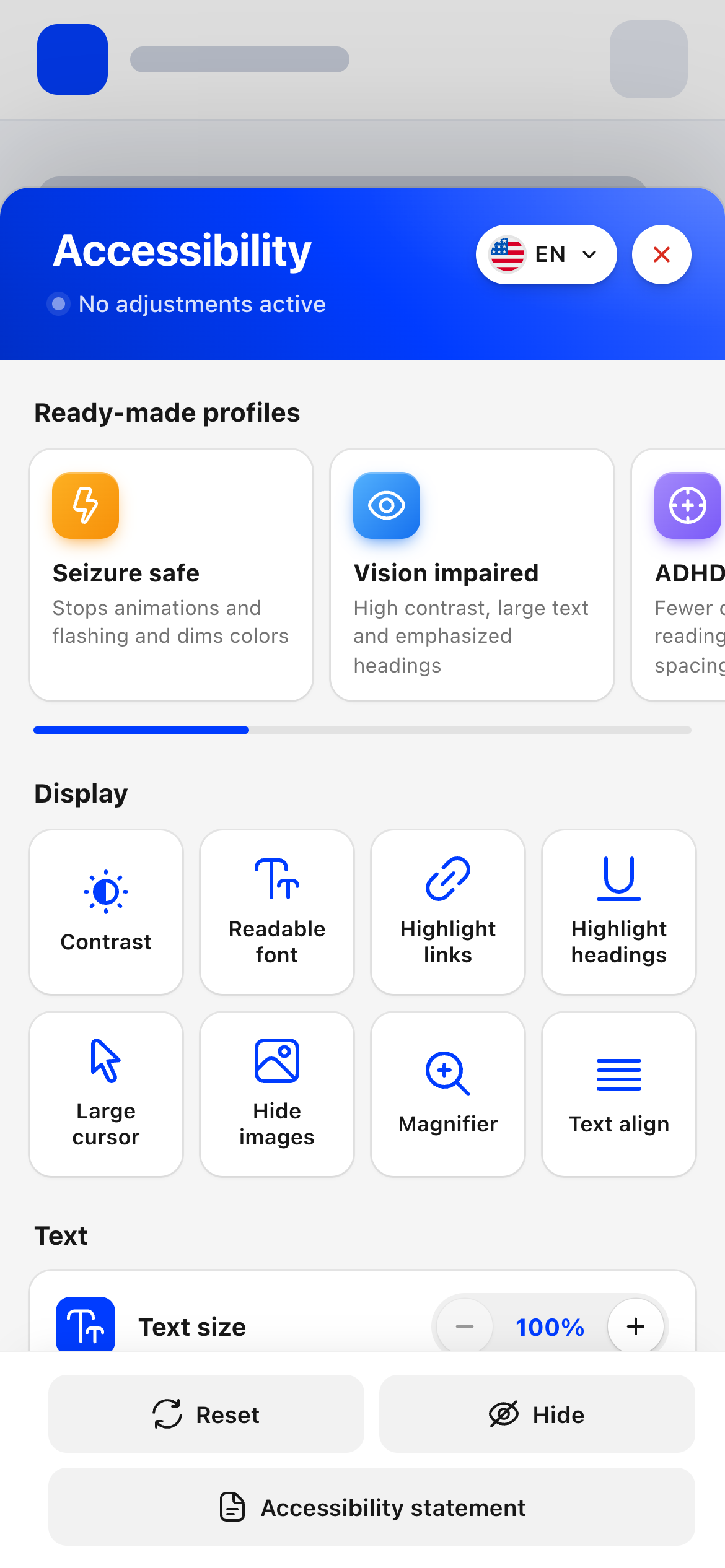
7 ready-made profiles
Each profile turns on a group of adjustments with one click.
- Seizure safe: stops animations and flashing and dims colors.
- Vision impaired: high contrast, larger text and stronger headings.
- ADHD and focus: fewer distractions, a reading guide and more space between lines.
- Dyslexia: a readable font, wider letter spacing and a reading guide.
- Motor impaired: keyboard navigation, a large cursor and larger text.
- Screen reader: keyboard navigation with links and headings highlighted.
- Seniors: large text, a large cursor and clear links.
14 adjustments
Display: contrast (high, inverted or grayscale), readable font, highlighted links, highlighted headings, large cursor, hidden images, a magnifier that enlarges the text under the pointer, and text alignment (left, center or right).
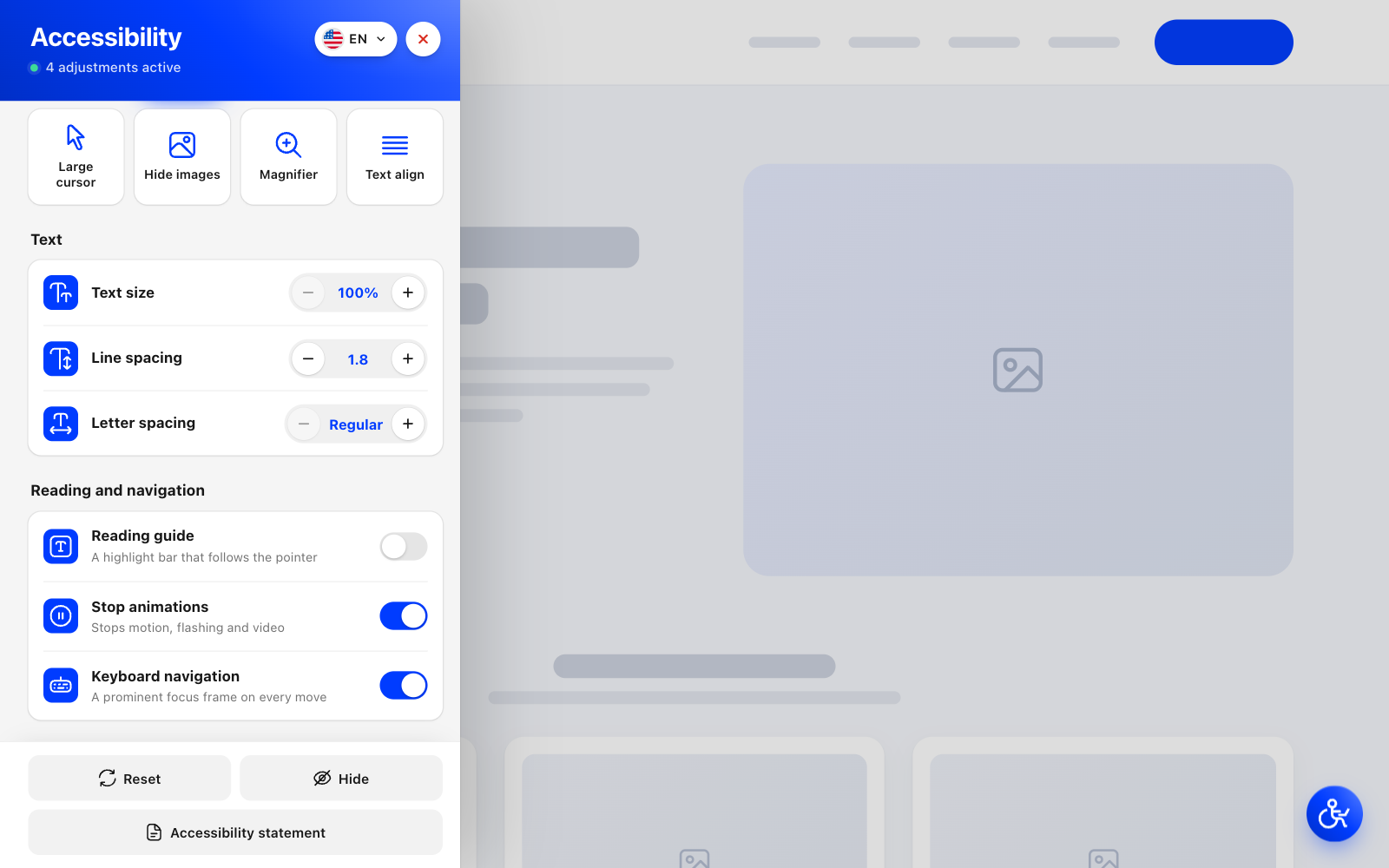
Text: text size, line spacing and letter spacing, each in several steps.
Reading and navigation: a reading guide that follows the pointer, a switch that stops motion, flashing and video, and keyboard navigation with a clear focus outline.
Make it fit your site
- Pick any brand color, and if you like, a separate color for the button icon.
- Choose a circle, rounded or square button in the size you want.
- Put the button in any of 9 positions: the corners, the middle of each edge or the center of the screen.
- Set desktop, tablet and mobile separately (position, distance from the edge, size and the side the menu opens from), or hide the button on any of them.
- Open the menu as a side panel on the left or right, or as a sheet that slides up from the bottom, which works well on phones.
- Turn off any profile or adjustment you don’t want to offer.
- Open the menu from your own link. Any link to
#real-accessibilityworks, for example in your footer or main menu. - Let visitors who don’t need the menu hide the button until their next visit (optional).
Accessibility statement
Many accessibility laws and policies expect a published accessibility statement. Pick your statement page and the menu will show an “Accessibility statement” button that links to it.
Missing ALT text
If an image in a post has no ALT text but the same image has ALT text in the Media Library, the plugin adds it to the page. That helps screen reader users, and it helps image search too.
Languages
The menu is available in 46 languages and regional variants:
- 🇺🇸 🇬🇧 🇨🇦 🇦🇺 English (US, UK, Canada, Australia)
- 🇪🇸 🇲🇽 Español (España, México)
- 🇧🇷 🇵🇹 Português (Brasil, Portugal)
- 🇦🇪 العربية
- 🇷🇺 Русский
- 🇮🇱 עברית
- 🇫🇷 🇨🇦 Français (France, Canada)
- 🇩🇪 Deutsch (du, Sie)
- 🇮🇹 Italiano
- 🇳🇱 Nederlands
- 🇵🇱 Polski
- 🇹🇷 Türkçe
- 🇺🇦 Українська
- 🇬🇷 Ελληνικά
- 🇧🇬 Български
- 🇷🇴 Română
- 🇨🇿 Čeština
- 🇸🇰 Slovenčina
- 🇭🇺 Magyar
- 🇭🇷 Hrvatski
- 🇷🇸 Српски
- 🇸🇪 Svenska
- 🇩🇰 Dansk
- 🇳🇴 Norsk bokmål
- 🇫🇮 Suomi
- 🇮🇷 فارسی
- 🇵🇰 اردو
- 🇪🇹 አማርኛ
- 🇬🇪 ქართული
- 🇦🇲 Հայերեն
- 🇦🇿 Azərbaycan dili
- 🇮🇳 हिन्दी
- 🇯🇵 日本語
- 🇨🇳 简体中文
- 🇹🇼 繁體中文
- 🇰🇷 한국어
- 🇹🇭 ไทย
- 🇻🇳 Tiếng Việt
- 🇮🇩 Bahasa Indonesia
By default the menu offers your site’s language plus English, Spanish, Portuguese, Arabic and Russian. You can turn any other language on or off and pick the flag shown next to it, and visitors switch languages from the top of the menu. If your site has a complete translation of the plugin in another language, you can add that one too.
Professional accessibility audit
The menu helps visitors, but legal compliance depends on your site’s own code and content. If you’d like an expert to check your site, the plugin’s “Accessibility audit” screen lets you ask Real Media’s accessibility team for a free quote.
Please note
An accessibility menu lets visitors adjust your site. On its own it does not make a website accessible, and it does not make it compliant with WCAG, the ADA, Section 508, the European Accessibility Act (EAA) or any other standard or law. Your site’s code and content need to be accessible as well.
Privacy
Visitor choices are saved in the visitor’s own browser (localStorage). Nothing is sent to your server or to anyone else, and no cookies are set.
Screenshots
Installation
- In your WordPress admin, go to Plugins > Add New, search for “Real Accessibility” and click Install Now. You can also upload the plugin folder to
/wp-content/plugins/real-accessability. - Activate the plugin on the Plugins screen.
- Open Real Accessibility in the admin menu, choose your brand color and button position, and click “Turn on the accessibility menu”. The menu shows up on your site right away.
FAQ
-
Is Real Accessibility really free?
-
Yes. Every profile, adjustment, language and design setting is free. There’s no paid version, no account and no usage limit.
-
Will this plugin make my website ADA or WCAG compliant?
-
No plugin can do that by itself. The menu lets visitors change how your site looks and behaves, which helps a lot of people, but WCAG, the ADA and similar laws are about the site itself: its code, content, images, forms and documents. If you want to know where your site stands, you can ask for a free quote for a professional audit on the plugin’s “Accessibility audit” screen.
-
Does it help with the European Accessibility Act (EAA)?
-
It gives visitors useful tools and a link to your accessibility statement. Like other accessibility laws, though, the EAA applies to the website itself. Use the menu together with an accessible theme, accessible content and, ideally, an accessibility audit.
-
Will the accessibility widget slow down my website?
-
No. The menu’s code is about 30 KB compressed. It doesn’t use jQuery or web fonts, and it doesn’t load anything from other servers.
-
It sets no cookies and sends nothing about your visitors anywhere. Each visitor’s choices are saved in their own browser (localStorage), so they carry over from page to page.
-
Will it work with my theme or page builder?
-
Yes. The plugin adds the menu itself and runs it in an isolated Shadow DOM, so it works with any theme or page builder, and your theme’s styles can’t change how it looks.
-
Does it work with caching plugins and CDNs?
-
Yes. All adjustments are applied in the visitor’s browser, so cached pages work as usual.
-
Yes. You can set the brand color, the icon color, a circle, rounded or square shape, the size, the corner radius, one of 9 positions and the distance from the edge of the screen.
-
Yes. Desktop, tablet and mobile each have their own position, size, distance from the edge and menu side, and you can hide the button on any of them.
-
Yes. Any link to
#real-accessibilityopens the menu, for example a link in your footer, your main menu or your accessibility statement page. -
Which languages are supported?
-
46 languages and regional variants, including English, Spanish, Portuguese, Arabic, Russian, Hebrew, French, German, Italian, Dutch, Polish, Turkish, Ukrainian, Japanese, Chinese, Korean and Hindi. You decide which ones the menu offers, and visitors switch between them from the top of the menu.
-
Does it support right-to-left languages?
-
Yes. Hebrew, Arabic, Persian and Urdu are fully supported. The menu and the settings screens both switch to right-to-left.
-
How do I add a language that isn’t listed?
-
Add a complete translation of Real Accessibility to your site, either from translate.wordpress.org or as a .mo file in
wp-content/languages/plugins. It will then show up under Real Accessibility > Languages. -
Does the plugin write my accessibility statement?
-
No. You publish the statement as a normal page on your site, and the plugin adds an “Accessibility statement” button to the menu that links to it.
-
Can I turn off features I don’t need?
-
Yes. You can turn off any profile or adjustment on the Features screen, and the menu will only show the ones you keep.
-
Can you check my website for accessibility issues?
-
Yes. Go to Real Accessibility > Accessibility audit in your admin and fill in the short form to get a free quote for a professional audit.
-
Does the plugin add a link or credit to my site?
-
Only if you say yes. When you turn the menu on, you can choose to show a small credit at the bottom of the menu with a link to the plugin page on WordPress.org, or turn it on without one. You can change this at any time under Real Accessibility > Features.
-
The Button and menu, Features and Languages screens show a Cloudways hosting banner (or a WooCommerce hosting banner if WooCommerce is active). It’s an affiliate link, so if you sign up through it, REALMEDIA may earn a commission at no extra cost to you. While one of those screens is open, the banner image loads from cloudways.com, which means Cloudways receives your browser’s IP address and user agent. There is no impression counter or tracking script, and nothing from Cloudways is loaded on your site’s front end or shown to your visitors.
-
What happened to the page reader from version 1?
-
It was removed in version 2.0. Screen readers, and the reading features that come with browsers and operating systems, do this job better.
Reviews


Contributors & Developers
“Real Accessibility: Accessibility Widget & Toolbar” is open source software. The following people have contributed to this plugin.
Contributors
“Real Accessibility: Accessibility Widget & Toolbar” has been translated into 7 locales. Thank you to the translators for their contributions.
Translate “Real Accessibility: Accessibility Widget & Toolbar” into your language.
Interested in development?
Browse the code, check out the SVN repository, or subscribe to the development log by RSS.
Changelog
2.0.1
- The plugin name now says what it is: Real Accessibility: Accessibility Widget & Toolbar.
2.0
- A completely new accessibility menu with 7 ready-made profiles and 14 adjustments: contrast modes, readable font, link and heading highlighting, large cursor, hidden images, magnifier, text alignment, text size, line and letter spacing, reading guide, stopping animations and keyboard navigation.
- One brand color for the whole menu, with automatic contrast for text and icons.
- Button shape, size, position and menu side, set separately for desktop, tablet and mobile.
- Live preview of the button and the menu in the settings.
- The menu and the settings screens are translated into 46 languages and regional variants, with right-to-left support. Visitors can switch languages from the menu.
- Accessibility statement button.
- Missing ALT text on images in posts is filled in from the Media Library.
- Request a quote for a professional accessibility audit from the settings.
- Visitor choices are saved in the browser. No cookies.
- Removed the page reader, the forced role=”link” and the removal of link targets.
1.1
- Security: the page reader no longer loads scripts from external servers. Please update.
- The page reader now uses the browser’s own speech engine and supports Hebrew and any other language with a voice installed on the device.
- The screen reader support page was updated. It is now in English and Hebrew and is excluded from search engines (noindex).
- Fixed PHP 8 warnings when reading the settings cookie.
- The settings cookie is now validated before use.
- The toolbar is keyboard accessible: real buttons for the page reader, ARIA states, Escape closes the toolbar, and hidden items can’t be focused while it is closed.
- role=”link” is no longer forced on links that already have a role.
- Black & White and Inverse Colors no longer break the toolbar’s fixed position.
- Tested with WordPress 7.1.
1.0
- First stable version.