

Description
Print-on-demand sync usually breaks in three ways: a WordPress update stops the plugin,
a proxy in front of the site blocks the outgoing request, or a sync fails and nobody is
told until a customer orders something that is out of stock.
PODSync is built for those three. It declares no upper WordPress version, checks its own
surroundings before every run, and never fails quietly. It copies your Printful products,
prices and stock status into WooCommerce and keeps the inventory in step.
What it does
- Copies products, prices and stock status from Printful into WooCommerce
- Marks an item out of stock as soon as Printful discontinues it or runs out, so you never sell what cannot be made
- Runs automatically every hour, or on demand
- Adds new products as drafts, so you decide when they go live
- Skips anything Printful sends incompletely, and says so, instead of writing half a product
- Removes repeated variants, so the same item is never added twice
- Shows a plain-language activity log of every run
What it will never do
- Delete or overwrite products it did not create
- Change your shop silently
- Take over your dashboard with notices and adverts
Built to keep working
Most print-on-demand sync trouble is not exotic: a WordPress update breaks the plugin, a
proxy in front of the site blocks outgoing requests, or a request fails and nobody is told.
PODSync checks for all three and reports what it finds in one place.
External services
This plugin connects to Printful, the print-on-demand service, to read the
products in your Printful store so they can be copied into WooCommerce.
- What is sent: the access token you enter, and nothing else. No shop data,
customer data or order data is sent anywhere. - When: only after you save an access token, then once an hour and whenever you
press “Sync now”. The plugin makes no outside requests before that, apart from
a single connection test on its own settings screen. - Where: api.printful.com only. Nothing is sent to the plugin author or to
any third party.
Printful terms of service: https://www.printful.com/policies/terms-of-service
Printful privacy policy: https://www.printful.com/policies/privacy
This plugin is not affiliated with or endorsed by Printful. “Printful” is a
trademark of Printful Inc. and is used here only to say what the plugin works
with.
Screenshots
Installation
- Install and activate the plugin. WooCommerce must be active first.
- In Printful, create an access token with permission to read your products and stock.
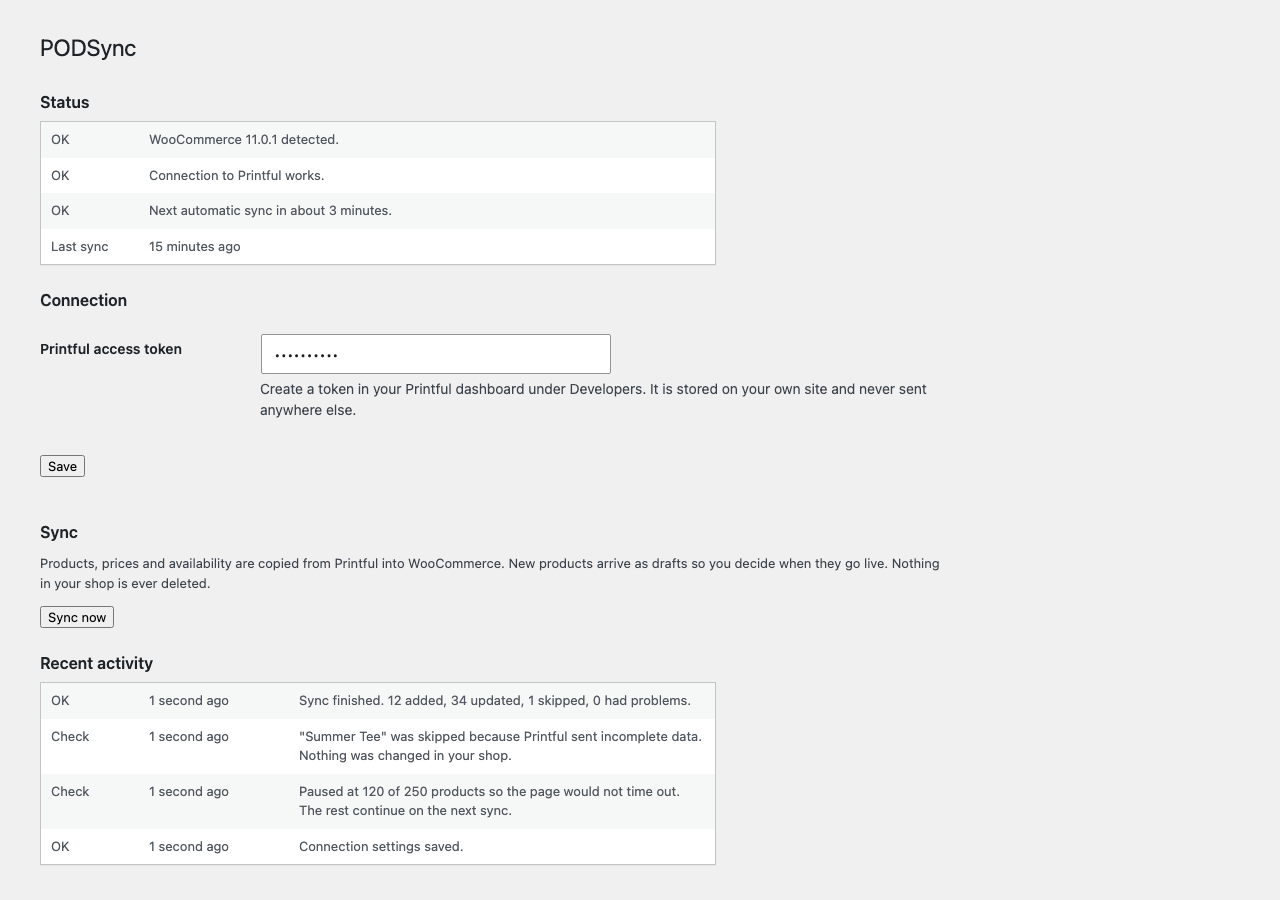
- In WordPress, go to WooCommerce > PODSync. The screen opens on a health check that says whether anything on this site would stop a sync before you have tried one.
- Paste the token into Printful access token and press Save.
- Press Sync now. The activity log below fills in as it runs and says in plain words what was copied, what was skipped and why.
After that it runs by itself every hour. New products arrive as drafts, so you decide when they go live, and an item goes out of stock as soon as Printful discontinues it or runs out.
If the health check says WordPress scheduled tasks are switched off on this site, the hourly run cannot happen and Sync now is the only way it will run. That is a setting on your hosting, not something the plugin can turn back on.
FAQ
-
Where do I get an access token?
-
In your Printful dashboard, under Developers. The token is stored on your own site and is
never sent anywhere except to Printful. -
Does it keep stock in step?
-
Yes. Every run reads the availability of each Printful item and sets the matching WooCommerce
product to in stock or out of stock. It syncs stock status, not a counted quantity, because
Printful prints to order and does not hold a fixed number of units for you. -
Will it change products I already have?
-
Only products PODSync created are updated. Everything else is left alone, and nothing is
ever deleted. -
Why do new products arrive as drafts?
-
So that nothing appears in your shop before you have looked at it.
-
Does it place orders with Printful?
-
Not in this plugin. Product, price and stock sync only, the parts that cannot cost
you a sale if something goes wrong. Order routing lives in the paid add-on described below. -
I need every size and colour, not just one variant
-
This plugin creates simple products from the first variant. A separate paid add-on,
PODSync Pro, turns every size and colour into a real WooCommerce variation and can send
paid orders to Printful. It is an add-on: it never switches anything off here, and this
plugin stays complete on its own. Details and price:
https://podsync.namubase.com/podsync-pro
Reviews
There are no reviews for this plugin.
Contributors & Developers
“PODSync for WooCommerce” is open source software. The following people have contributed to this plugin.
Contributors
Translate “PODSync for WooCommerce” into your language.
Interested in development?
Browse the code, check out the SVN repository, or subscribe to the development log by RSS.
Changelog
1.0.0
- Marked stable. No behaviour changes from 0.1.1. The version number now says what the
plugin already was: reviewed, released and running on live shops.
0.1.1
- Fixed: syncing twice in the same request could fail if a product had been deleted in between.
- Added a FAQ entry explaining which parts are handled by the separate paid add-on.
- Added a plain comparison of what this plugin does and what the paid add-on adds, with
the steps to install it. Nothing here is switched off or held back.
0.1.0
- First release: product, price and availability sync, self-check, activity log.