
Description
Describr is the best membership and user profile plugin for WordPress. Describr makes it easy to create beautiful user profiles on the front end. Describr is extensible and makes it easy for you to create websites where users can become members. Describr gives you powerful tools to add capabilities to roles and restrict content.
Major Features:
- Front-end user profiles.
- Front-end account page.
- Allows you to create capabilities, grant/deny capabilities to user roles, and delete user roles.
- Allows you to grant users having specific roles the capability to delete their accounts on the front end.
- Allows you to restrict content on user profiles using user roles.
- Allows you to choose the fields that are shown on user profiles and the account page.
- Allows you to activate or deactivate users.
- Allows you to set Default User Status.
- Allows you to change users’ status.
- Allows you to force users to confirm their accounts.
- Adds password field to registration form.
- Email notifications.
- Users can send messages to each other.
- Users can block other users.
- Users can upload profile photos.
- Users can grant access to their profiles to specific set of users.
- Shows author posts & comments on user profiles.
- Extensible with many filters and actions.
See the structure of the URLs used to locate user profiles and account page on the front end here.
PS: If a feature does not work properly, report it at our support page, and we will fix the issue as soon as possible.
Repositories for JavaScript Libraries
Feedback
The plugin has many downloads, over 2000, but few active installations. This makes us very interested in finding out why people download the plugin but decide not to use it. If you fall into this category, we kindly ask that you leave your feedback at our Facebook page.
Screenshots

Admin Settings 
Admin Settings – Roles 
Admin Users – Active, Status & Registered Columns 
Admin Users – Bulk Actions 
User Profile – Front-end 
User Profile – Front-end 
User Account Settings – Front-end 
User Account Settings – Front-end 
Important Person 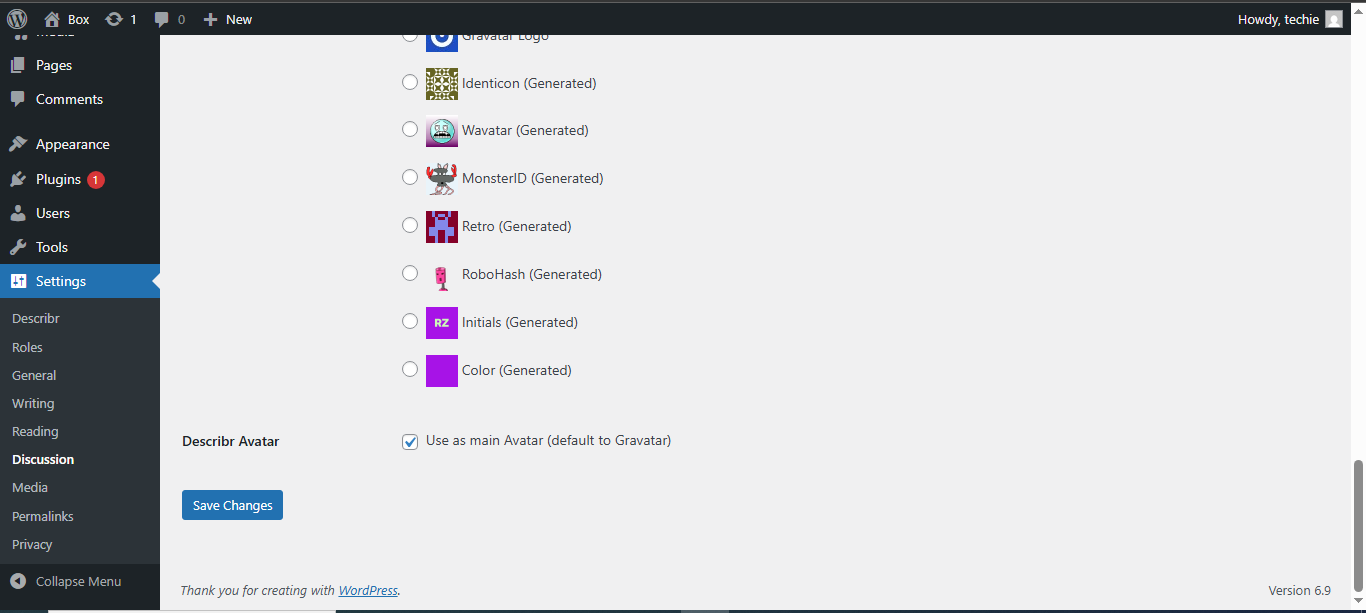
Admin Settings – Avatar
Installation
Upload the Describr plugin to your blog and activate it.
…You’re done!
FAQ
-
Is Describr 100% free?
-
Yes. There are no fees to use any feature offered by Describr.
-
Do you need coding skills to use Describr?
-
No. You do not need coding skills to use Describr. All features are accessible and can be managed in the browser.
-
Can Describr delete a role?
-
Yes. Describr can delete all roles except WordPress’ defined roles, which are Administrator, Editor, Author, Contributor, and Subscriber.
-
Can Describr delete capabilities from any role?
-
Yes. Describr deletes capabilities from any role. However, The Administrator role must have at least one capability.
-
Is Describr mobile responsive?
-
Yes. Describr is designed to adapt nicely to any screen resolution. It includes specific designs for phones, tablets, and desktops.
-
Is Describr multisite compatible?
-
Yes. Describr works great on both single site and multisite WordPress installations.
-
Does Describr work with any WordPress theme?
-
Yes. Describr will work with any properly coded theme. However, some themes may cause conflicts with the plugin. If you find a styling issue with your theme please create a post in the community forum.
-
Why the User and Account pages show on the Administration panel’s Pages Screen but not on the front end?
-
This could occur if the rewrite rules are not flushed after the pages are created. To flush the rewrite rules, go to settings>permalinks, scroll to the bottom, and click the Save Changes button.
-
Is special permission needed to edit Describr settings?
-
Yes. Users must have the manage_options capability to access and edit Describr settings.
Reviews

Contributors & Developers
“Describr – Membership, User Profile, Content Restriction & Role Editor Plugin” is open source software. The following people have contributed to this plugin.
Contributors
“Describr – Membership, User Profile, Content Restriction & Role Editor Plugin” has been translated into 5 locales. Thank you to the translators for their contributions.
Interested in development?
Browse the code, check out the SVN repository, or subscribe to the development log by RSS.
Changelog
3.1.3
Release Date – 21 January 2026
Changed
- The user profile and account page’s slugs that are translated by WPML are added to the rewrite rules. The original slugs were incorrectly added twice.
- The About tab’s default subtab changes from Tagline to Basic Info on the user profile.
- Display name and username are only displayed in About if the current user can edit the profile, because these fields are also displayed in the profile’s header.
- Nicename is only displayed in About if the current user can edit the profile, because the nicename is the part of the profile’s URL that identifies the user and is already displayed if the profile is being viewed.
3.1.2
Release Date – 7 January 2026
Added
- A cached profile’s data are cleaned before fetching client-bound data, enabling the displaying of the most up-to-date data. In previous versions, a profile’s old data was sent to the client after the profile was updated.
3.1.1
Release Date – 6 January 2026
Changed
- User’s status is only shown if a user is not approved.
- Social network’s HTML on a profile is removed when a user deletes social network using Ajax.
- The box for making a user important is only printed in the Admin profile if the current user can edit users.
Added
- Linked social-media icons are display in the profile’s summary, to the right of the profile picture.
3.1.0
Release Date – 13 December 2025
Changed
- Replaced PHP functions
mb_trim,mb_ltrim,mb_rtrimwithtrim,ltrim, andrtrim, respectively for compatibility with PHP < 8.4. - Retrieved email content type from email header if the content type is
multipart/*. - Removed the loose closing parenthesis from the translatable “Persian (Afghanistan))” text.
- Added context to the time zone translatable “Luxembourg” text.
- Bumped “Requires at least” to 6.0.
- Reduced “Requires PHP” to 7.0.
- Changed Confirm Account notice.
3.0.2
Release Date – 2 December 2025
Changed
- Cities suggested to users as they type are no longer translatable.
- Bumped “Tested up to” to 6.9
3.0.1
Release Date – 15 October 2025
Changed
- User is valid if no status exists.
- Replaced single quotes with double quotes in JavaScript files.
- Changed the name of the JavaScript property to delete the profile picture from “delete” to “deletePicture”.
- Changed the name of the JavaScript property to assign the profile picture from “assign” to “assignPicture”.
- Removed the
describr.eventsmethod inassets/js/main.js. - Checked if the post exists when retrieving the attachment ID for a profile photo in
includes/class-avatar.php. - Restored the current blog before any returning in
includes/class-upload-photo.php. - Uncommented
describr_messages_keysuser meta inincludes/class-user.phpso that users can reply to messages.
Added
- Front-end profile photo is audited if it is deleted by a user.
- Function
describr_avatar_ratingto retrieve the avatar’s rating. - Function
describr_print_profile_picture_rating_modalto print profile picture rating modal. Popper.jsto display popups in the admin interface.- The ability to rate avatar on the front end.
- Additional placeholders in email templates.