

Description
Your host wants you on a newer PHP version. Will your site survive the switch?
Airworthy reads the code of every installed plugin and of your theme (on multisite: every network-enabled theme) and checks it against the PHP version you pick, from PHP 8.0 to PHP 8.6. It also looks each plugin up on WordPress.org to see whether it is still maintained. You get one clear verdict per plugin and theme, before you touch your server settings.
Important: Airworthy helps you plan a PHP upgrade; it doesn’t guarantee one. Always back up your site and test the new PHP version on a staging copy before changing your live site.
What you get
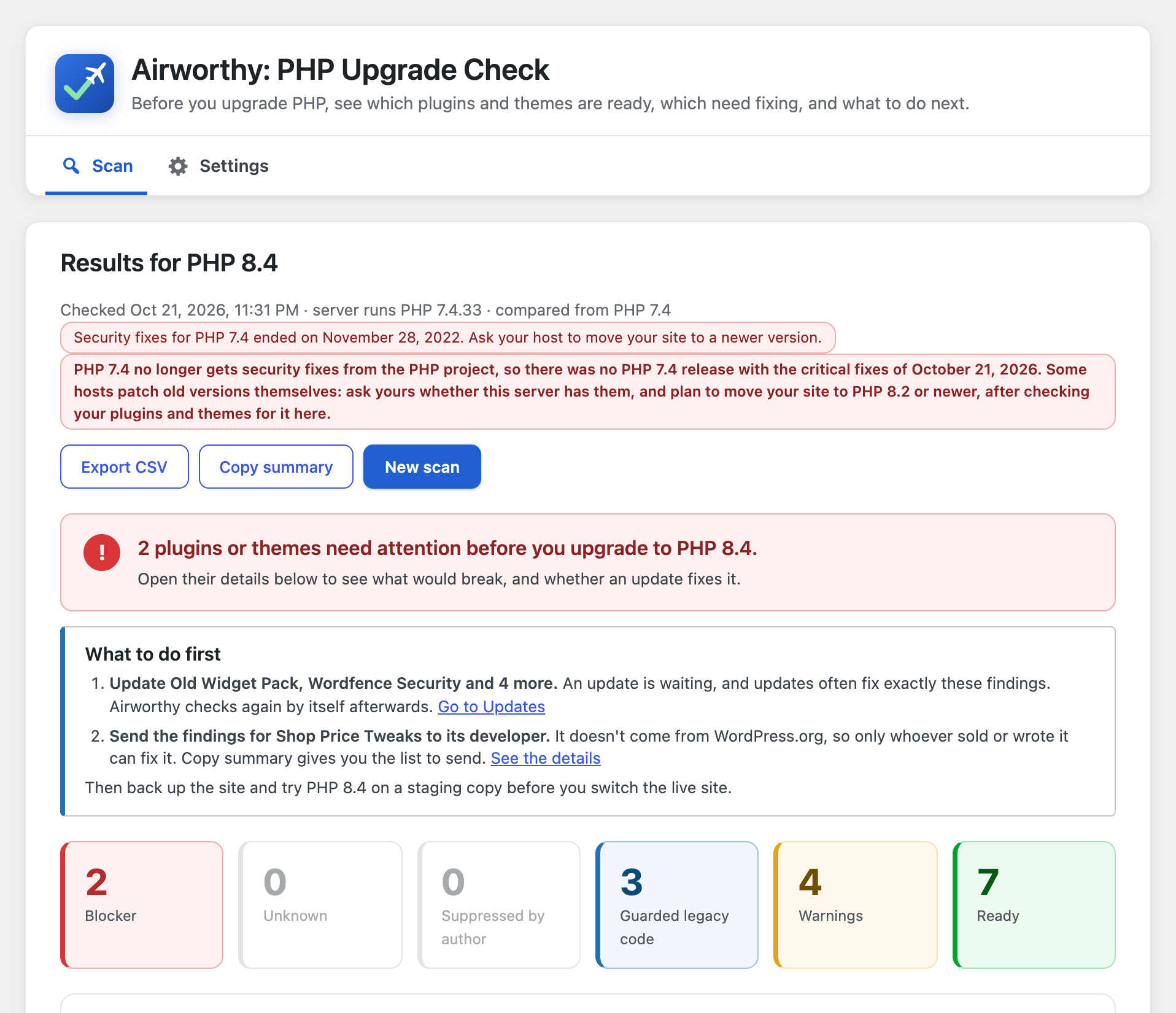
- A verdict for every plugin and theme. Blocker, Unknown, Suppressed, Guarded, Warnings or Ready, each with one plain sentence explaining what it means for you.
- Fewer false alarms. Many plugins carry old code that only runs on old PHP versions, behind a version check. Airworthy recognises those checks and marks that code as guarded instead of broken. In our test of the 30 most popular plugins, this cut the plugins flagged as broken from 4 to 2, and both of those contain code that really would fail on PHP 8.
- Maintenance signals from WordPress.org (if you allow it). Plugins that were closed (removed from the directory), not updated in two years, not tested with recent WordPress versions, or that need a newer PHP version than you picked are called out.
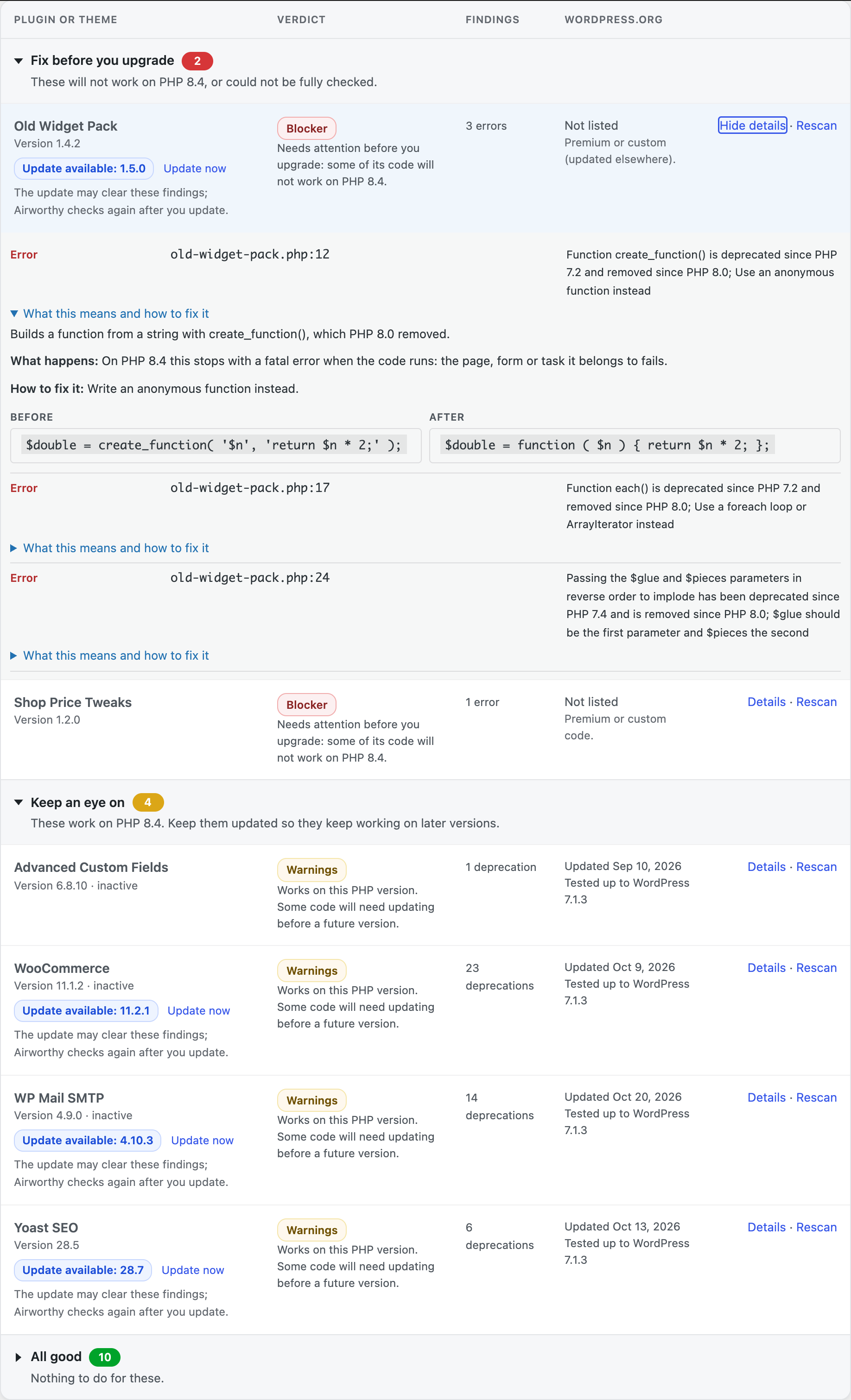
- Know what to do first. Under the overall answer, Airworthy lists the next steps that matter most for your site: update this plugin, replace that closed one, send the findings for your custom code to its developer. Results are grouped into fix before you upgrade, keep an eye on, and all good. Plugins with an update waiting say so, with a one-click update, and Airworthy checks them again once they’re updated.
- Explanations in plain English. Each finding says what changed in PHP, what happens on the new version (the page stops with a fatal error, or PHP only logs a notice for now) and how to fix it, with a short before-and-after code example for the common cases.
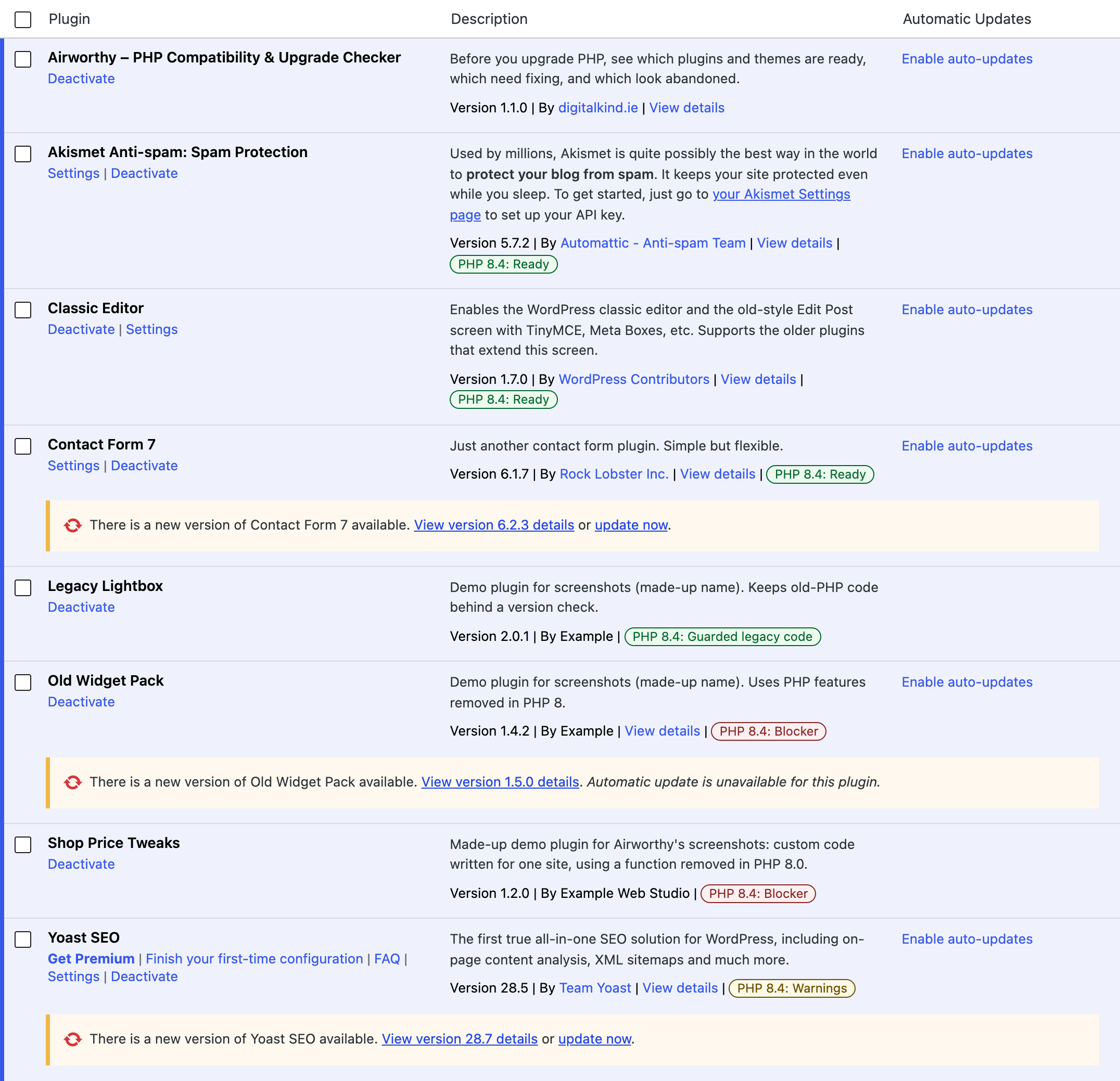
- Verdicts on the Plugins screen. After a scan, each plugin’s row on the Plugins screen shows its verdict, such as “PHP 8.4: Ready” or “PHP 8.4: Blocker”, linking to its details. You see it every time you manage your plugins.
- Ready for PHP 8.6. PHP 8.6 is due on 19 November 2026. Airworthy already checks for its deprecations with its own checks, and you can check against its release candidate today.
- Know how long you have. Airworthy shows when your server’s PHP version stops getting security fixes, so you can plan the upgrade before it’s urgent.
- Know when your PHP needs a security update. If your server’s PHP is missing the latest PHP security fixes, Airworthy says so on its screen and in Site Health, and tells you to ask your host to update (a routine update that doesn’t change how your plugins work). It knows that many hosts ship the fixes as an update that keeps the old version number, so it reads when your PHP was built instead of trusting the number alone.
- The details when you want them. Every finding shows the file, the line, what changed in PHP and how to fix it. Filter by verdict, rescan one plugin after an update, copy a plain-text summary to paste into an email or support ticket, or download everything as a CSV file for your developer or host.
- Sensible default. Airworthy recommends the oldest PHP version that still gets security fixes: the smallest upgrade that keeps your site protected. It shows every version’s support dates.
- Safe on any host. Scans run in the background in short batches, so they never time out, and they watch memory use. You can leave the page while a scan runs. Nothing is changed on your site.
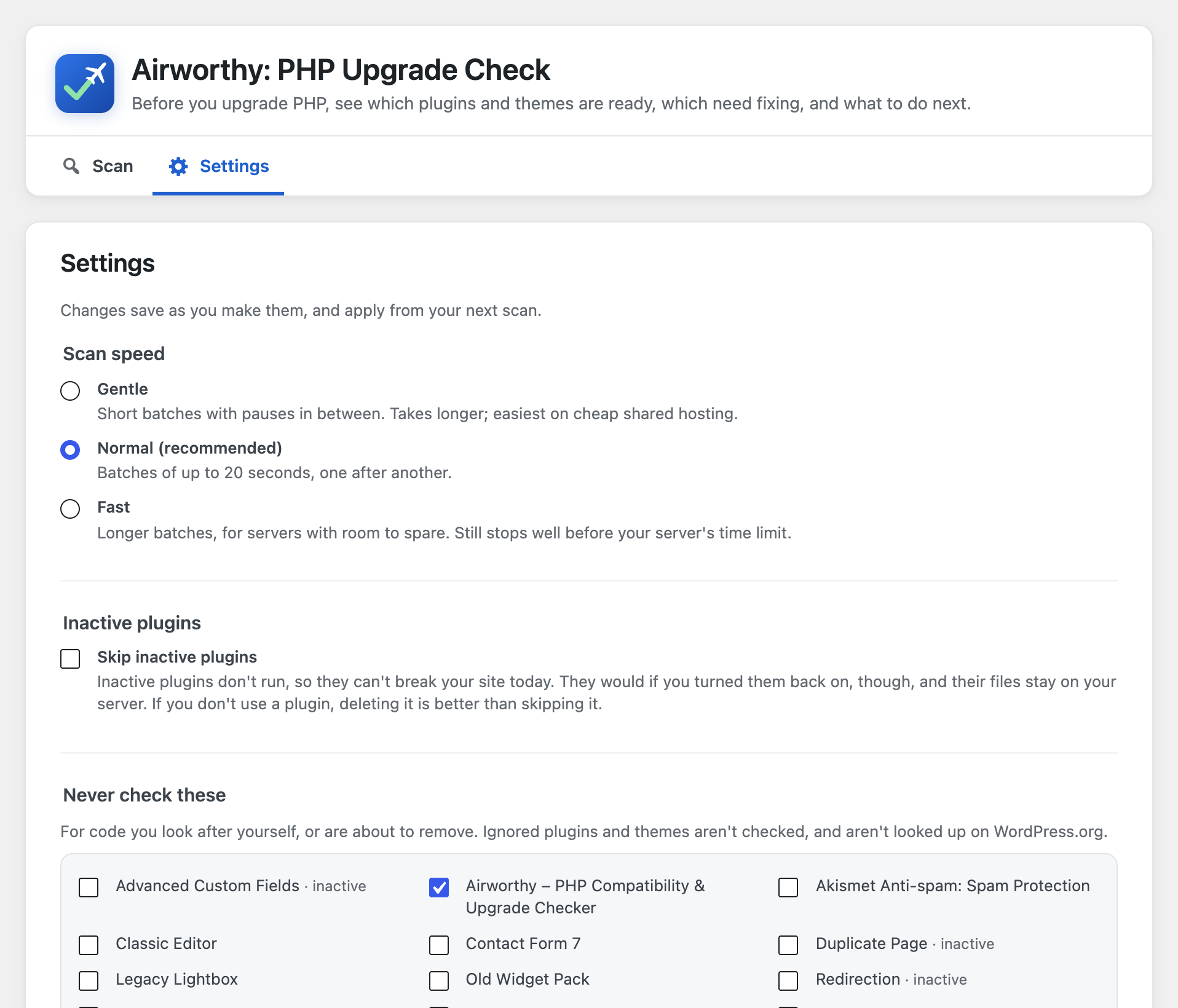
- Settings that fit your site. Skip inactive plugins, keep a list of plugins and themes never to check, and choose a gentler scan speed for cheap shared hosting.
- In Site Health too. Tools > Site Health shows whether your plugins and themes are ready for the next PHP version, with a link to the full results.
- Multisite ready. On a network, Airworthy is activated network-wide and lives under Network Admin > Settings.
For freelancers and agencies
Hosts are moving sites off old PHP versions, and every client asks the same question: will my site break? Install Airworthy on each client site before the host’s deadline (it’s free, on as many sites as you like), and you have an answer per plugin in minutes. Copy summary gives you a plain-text list to paste into the client email or the host’s support ticket, the CSV has every finding for your developer, and the Site Health check keeps showing whether the site is ready for the next PHP version. For many sites at once, use WP-CLI.
WP-CLI
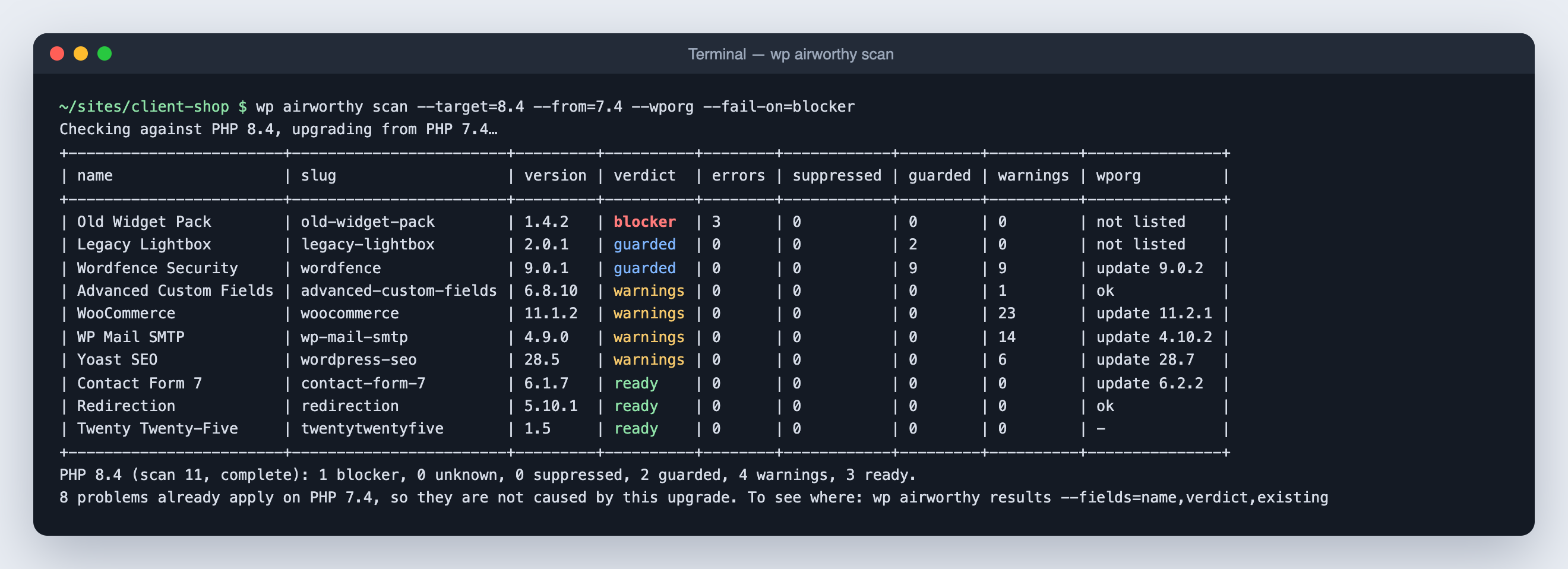
Everything on the admin screen also works from the terminal:
wp airworthy scan --target=8.4checks every plugin and theme and prints the results. Add--wporgto include the WordPress.org checks.wp airworthy scan --only=my-plugin --fail-on=blockerexits with code 1 if anything would break, for CI.wp airworthy results --verdict=blocker,unknownshows what needs attention.wp airworthy issues <slug>lists one plugin’s findings with file and line.wp airworthy rescan <slug>,wp airworthy export --file=report.csv,wp airworthy status,wp airworthy cancel,wp airworthy resumeandwp airworthy targetsdo what their names say.
Privacy
This plugin reads your plugin and theme files on your own server; it never runs them and never sends them anywhere.
Airworthy only contacts an outside server if you allow it. Before your first scan it asks whether to also check WordPress.org, and remembers your answer; you can change it at every scan (in WP-CLI: --wporg or --no-wporg). If you say no, nothing leaves your server.
If you say yes, it looks up each plugin’s slug (its folder name) in the public WordPress.org plugin directory (api.wordpress.org), one plugin per request, to show whether it is still maintained. Nothing else is sent: not your site’s address (the requests use their own “Airworthy” user agent instead of WordPress’s default, which includes your site URL), not your PHP version. As with any web request, WordPress.org sees your server’s IP address. Answers are cached for 24 hours.
Airworthy sets no cookies, adds nothing to your site’s front end, and has no tracking, account or sign-up.
Source code and build
The full, human-readable source code is public at https://github.com/DigitalKind/airworthy.
The scan engine is built from open-source libraries: PHP_CodeSniffer, PHPCompatibility and PHPCSUtils. Other plugins, or your own tools, may load their own copies of these, possibly different versions. To keep the copies apart, the release build runs them through PHP-Scoper (https://github.com/humbug/php-scoper), which moves their code into Airworthy’s own Airworthy\Vendor namespace. The scoped code in the vendor/ folder is ordinary, readable PHP; only the namespace names change.
To rebuild the plugin from source, clone the repository and run bin/build.sh. It installs the exact library versions pinned in plugin/composer.lock, scopes them, checks the result and writes dist/airworthy.zip. docs/ENGINE.md explains each step.
Action Scheduler is bundled unscoped, as WooCommerce and other plugins do, because it is designed to share one copy between all plugins that include it.
Bundled libraries and licences
Airworthy’s own code is GPLv2 or later. It bundles:
- PHP_CodeSniffer 4.0.4: BSD-3-Clause. https://github.com/PHPCSStandards/PHP_CodeSniffer
- PHPCompatibility 10.0.0-alpha2: LGPL-3.0-or-later. https://github.com/PHPCompatibility/PHPCompatibility
- PHPCompatibilityParagonie 2.0.0-alpha2: LGPL-3.0-or-later. https://github.com/PHPCompatibility/PHPCompatibilityParagonie
- PHPCompatibilityWP 3.0.0-alpha2: LGPL-3.0-or-later. https://github.com/PHPCompatibility/PHPCompatibilityWP
- PHPCSUtils 1.2.3: LGPL-3.0-or-later. https://github.com/PHPCSStandards/PHPCSUtils
- Action Scheduler 4.2.0: GPL-3.0-or-later. https://github.com/woocommerce/action-scheduler
Because Action Scheduler is GPLv3 and the PHPCompatibility libraries are LGPLv3, the plugin as distributed, taken as a whole, is covered by the GPL version 3. Each library’s licence file is included in its folder. A software bill of materials (sbom.cdx.json, CycloneDX format) lists every bundled component and version.
Screenshots



Installation
- In your WordPress admin, go to Plugins > Add New, search for “Airworthy” and click Install Now, then Activate. Or upload
airworthy.zipunder Plugins > Add New > Upload Plugin. - Go to Tools > Airworthy (on multisite: Network Admin > Settings > Airworthy).
- Pick the PHP version you want to move to (the recommended one is preselected) and click Start scan.
- Wait for the scan to finish, or come back later. You get a notice when the results are ready.
Only administrators can run scans and see results (on multisite, network administrators).
To remove everything Airworthy stored (its three database tables, settings and scheduled jobs), delete the plugin from the Plugins screen.
FAQ
-
Does Airworthy change my PHP version or my site?
-
No. It only reads files and reports. You change the PHP version yourself, usually in your hosting control panel, when you’re ready.
-
What can a static scan catch, and what can’t it?
-
Airworthy reads the code without running it. That catches most PHP upgrade problems: functions, classes and constants that were removed, changed syntax, removed extensions, and new reserved words. It sees every file, including code paths your visitors rarely trigger.
It can’t see what only happens when code runs. For example: code that builds function names at run time, behaviour that depends on your data or settings, and problems in files a plugin downloads or generates later. Some newer PHP changes (such as a few PHP 8.1, 8.5 and 8.6 deprecations that depend on the values code passes around) can’t be detected reliably by reading code yet. So a “Ready” verdict means no problems were found, not a guarantee. Test on a staging copy of your site, and keep a backup, before you switch.
-
Is a “Ready” result a guarantee that my site will work?
-
No. Airworthy reads code without running it, so some problems can’t be seen this way: code that only fails when it runs with your data or settings, your server’s configuration, or other software on your site. Treat the results as guidance for planning. Before changing PHP on your live site, back up your files and database, try the new version on a staging copy and check the pages that matter most (checkout, forms, logins), and make sure you know how to switch back. Airworthy is free software provided without any warranty (see the licence), and DigitalKind isn’t liable for the results of changing your PHP version.
-
Why are some problems marked “already on your PHP”?
-
Airworthy compares the PHP version your site runs now with the one you’re moving to. Only PHP changes in between can break something when you upgrade. Code hit by an older change (for example a function removed in PHP 7.0, on a site that already runs PHP 8.3) either never runs on your site or is already failing today, and upgrading doesn’t change that. Those findings are still listed in each plugin’s details, but they aren’t counted as Blockers. If you’re checking a copy of a site that runs on another server, choose its PHP version under “Compare from another PHP version”.
-
What does each verdict mean?
-
- Blocker: needs attention before you upgrade. Some of its code will not work on the PHP version you picked, or it needs a newer PHP version than that.
- Unknown: some files could not be checked, so there’s no verdict yet. The details list which files and why.
- Suppressed: the author marked some code as intentionally left as-is. Most of the time that’s fine, but worth confirming with them.
- Guarded: it contains code for old PHP versions, but only runs it on those versions. Nothing to do.
- Warnings: it works, but uses features that are being phased out. Nothing breaks now; the author should update before a future PHP version.
- Ready: nothing that would break on the PHP version you picked.
-
What is sent to WordPress.org?
-
Nothing, unless you allow it when you start a scan. If you do, only each plugin’s slug (its folder name), to look up its public directory entry: not your site address, not your PHP version. See Privacy above. Themes aren’t looked up.
-
A plugin shows as Blocker. What should I do?
-
Start with “What to do first” under the overall answer: it puts the steps in order for your site. Update the plugin first, if an update is available; Airworthy checks it again by itself afterwards. If it’s still a Blocker, open its details: each finding explains what would happen and how it’s fixed. Use Copy summary or the CSV to send the findings to the plugin’s author or your developer. If the plugin was closed on WordPress.org, look for a maintained replacement.
-
Will a scan slow down my site?
-
Scans run in the background in short batches of about 20 seconds, using WordPress’s own scheduled tasks (Action Scheduler). Visitors aren’t affected. A typical site with 20–30 plugins takes a few minutes; Airworthy estimates the time before you start.
-
Which PHP versions can I check against?
-
PHP 8.0, 8.1, 8.2, 8.3, 8.4, 8.5 and 8.6. Versions that no longer get security fixes are marked as ended; you can still check them, but results for them are less precise. Until PHP 8.6 is released on 19 November 2026, it’s marked as a release candidate and is never suggested by default.
-
Is Airworthy ready for PHP 8.6?
-
Yes. PHP 8.6 doesn’t remove any functions or extensions, so it shouldn’t break a site that works on PHP 8.5. It deprecates about 30 things, such as
spl_object_hash(),is_long()andis_integer(),returninside afinallyblock and returning a value from a constructor. Code that uses them still works on 8.6 but will stop working in a later version, so Airworthy shows them as Warnings, with the replacement. PHPCompatibility, the open-source ruleset Airworthy builds on, doesn’t cover PHP 8.6 yet, so these checks are Airworthy’s own (in the plugin’sstandards/Airworthyfolder). A few 8.6 deprecations only show when code runs, with particular values, and can’t be found by reading code. -
Why can’t my site update to WordPress 7.0 or later?
-
WordPress 7.0 needs PHP 7.4 or newer. On PHP 7.2 or 7.3, WordPress won’t offer the update, so the site stays on WordPress 6.9. The way forward is a newer PHP version, and that’s what Airworthy checks for: it runs on PHP 7.2 and up, so install it on the site as it is. Then check your plugins and theme against the version your host can move you to. Aim for PHP 8.2 or newer rather than 7.4, which no longer gets security fixes. Once the PHP switch is done, WordPress offers the update as usual.
-
Why do I now see Tools > Scheduled Actions?
-
That menu comes from Action Scheduler, the background-job library Airworthy uses (WooCommerce uses the same one). It’s harmless, and lists Airworthy’s jobs under the “airworthy” group.
-
Do I need an account, licence or subscription to see the results?
-
No. Every verdict, finding, explanation and export is free, on as many sites as you like, with no account, licence key or sign-up. The scan runs on your own server, and your plugins’ code never leaves your site. The only outside request is the optional WordPress.org lookup, which you choose before each scan and which sends only plugin folder names (see Privacy).
-
Can I use Airworthy on client sites?
-
Yes. Airworthy is free and GPL-licensed, with no limit on sites and no account. Agencies often run it from WP-CLI (
wp airworthy scan --target=8.4 --fail-on=blocker) across all their sites, and use Copy summary or the CSV export for each client. -
Does Airworthy protect my site from PHP security vulnerabilities, such as CVE-2026-109618 and CVE-2026-109619?
-
No. Airworthy doesn’t patch PHP or block attacks; only a PHP update from your host does that. What it does is tell you whether your server’s PHP has the latest PHP security fixes it knows of (currently the release of 21 October 2026, which fixed those two), on its start screen, in the results and in Tools > Site Health. A version number alone can’t settle that: hosts on CloudLinux, cPanel, Plesk, Debian, Ubuntu or Red Hat ship the fixes as an update that keeps the old version number. So Airworthy also reads when your PHP was built. Built on or after the release day, it very likely has the fixes (Airworthy says so, and suggests confirming with your host). Built before, on one of those hosts, Airworthy asks you to get your host to apply the PHP update. Built before anywhere else, it’s flagged as missing the fixes. When the build date can’t be read, Airworthy says it can’t tell from the version alone and to ask your host. The release data is bundled with the plugin, so Airworthy learns about a new PHP security release when it is itself updated.
-
How do I report a security problem?
-
Email security@airworthywp.com. Please don’t post it in the public support forum. See SECURITY.md in the source repository for how reports are handled.
Reviews

Contributors & Developers
“Airworthy – PHP Compatibility & Upgrade Checker” is open source software. The following people have contributed to this plugin.
Contributors

Translate “Airworthy – PHP Compatibility & Upgrade Checker” into your language.
Interested in development?
Browse the code, check out the SVN repository, or subscribe to the development log by RSS.
Changelog
1.1.2
- Improved: the screen’s title and tabs are now one panel, with an icon on each tab and a blue line under the open one, so the tabs are easy to spot. Notices from other plugins now appear above Airworthy’s header instead of between the title and the tabs. On a phone the tabs scroll sideways and the open tab is brought into view.
- Readme: new answers on whether you need an account or licence to see results (you don’t), and on why a site on PHP 7.2 or 7.3 can’t update to WordPress 7.0.
1.1.1
- Fix: the PHP security-fixes check no longer calls a patched server unpatched. CloudLinux, cPanel, Plesk, Debian, Ubuntu and Red Hat ship PHP security fixes as an update that keeps the old version number, so a version below php.net’s fixed release doesn’t mean the fixes are missing. Airworthy now reads when your PHP was built: built on or after the release day, it very likely has the fixes (shown as good, with a note to confirm with your host); built before, on one of those hosts, Airworthy asks you to get your host to apply the PHP update; built before anywhere else, it’s still flagged as missing them. When the build date can’t be read, Airworthy says it can’t tell from the version alone instead of raising an alarm. Nothing is sent anywhere: the build date and vendor are read on your server.
1.1.0
- New: PHP 8.6. Check against PHP 8.6, due on 19 November 2026 (a release candidate until then, so it’s never the default). PHPCompatibility doesn’t cover PHP 8.6 yet, so Airworthy brings its own checks for its deprecations, such as
spl_object_hash(),is_long(),returninfinallyand constructors that return a value. PHP 8.6 removes nothing, so these are Warnings: the code works on 8.6 but should be updated before a later version. - New: What to do first. Under the overall answer, up to three next steps for your site, most important first: replace closed plugins, install updates that fix problems, ask a plugin’s developers for a fix, send findings for custom code to its developer, check files that couldn’t be read. Each links to the plugin’s details.
- New: plain-English explanations. Each finding’s details say what changed in PHP, what happens on the new version and how to fix it, with a before-and-after code example for the common cases. The CSV export has a new Explanation column.
- New: verdicts on the Plugins screen. After a scan, each plugin’s row shows its verdict for the PHP version you checked, linking to its details. It says when a plugin hasn’t been checked since it was updated or installed, and it disappears once your server runs that PHP version.
1.0.3
- New: a PHP security-fixes check on the start screen, in the results and in Tools > Site Health. Airworthy knows the PHP security release of 21 October 2026 (PHP 8.5.12, 8.4.27, 8.3.36 and 8.2.35, fixing two critical vulnerabilities, CVE-2026-109618 and CVE-2026-109619). If your server’s PHP is older than those, it tells you to ask your host to update: an update within the same version is routine and doesn’t change how your plugins work. PHP 8.1 and older got no release from the PHP project, so for those it says to ask your host whether they patched it and to move to a newer version. The data is bundled with the plugin; nothing is fetched.
- PHP support dates checked against php.net on 21 October 2026: no change.
1.0.2
- Fix: code that fails on every PHP version, such as
$thisinside a static closure (found in the latest version of a widely used plugin), is now listed as a problem that already applies on your current PHP, not as a Blocker for the upgrade. It isn’t caused by changing PHP, so it shouldn’t hold the upgrade back.
1.0.1
- New: Copy summary, next to Export CSV on the results. Copies a plain-text summary (the overall answer, then each plugin and theme grouped by what to do next, with updates waiting and closed plugins) to paste into an email or support ticket for your host or developer.
- New: after a finished scan, the results ask once whether you’d leave a review on WordPress.org. Maybe later asks again in 30 days; Don’t ask again means never. It only appears on Airworthy’s own screen, below the results.
- PHP support dates checked against php.net on 16 October 2026: PHP 8.2 gets security fixes until 31 December 2026.
- WP-CLI: the note about problems that already apply on your current PHP version now says how to list them (
wp airworthy results --fields=name,verdict,existing); it pointed to a column the scan table doesn’t show.
1.0.0
- First release.
- Checks every plugin and theme against PHP 8.0 to 8.5, with a clear verdict for each: Blocker, Unknown, Suppressed by author, Guarded legacy code, Warnings or Ready.
- Tells real problems from old code that never runs on the new PHP version, including code that falls back to a replacement PHP extension.
- Marks problems that already apply on the PHP version your site runs now, so they aren’t counted as new with this upgrade.
- Optional WordPress.org check (you choose): plugins removed from WordPress.org, not updated in two years, or needing a newer PHP version.
- Results grouped by what to do next: fix before you upgrade, keep an eye on, all good.
- Shows which plugins and themes have an update waiting, with a one-click update; Airworthy checks them again after they’re updated, including when a plugin is replaced by uploading a zip.
- Shows how long your server’s PHP version keeps getting security fixes.
- Runs in the background with live progress, so a large site never times out. A stopped scan can be continued where it left off.
- Settings: skip inactive plugins, never scan chosen plugins or themes, and choose how hard scans work your server.
- A PHP upgrade readiness check in Tools > Site Health.
- CSV export and WP-CLI commands.